
Claude Code Agent Teams: Your AI-Powered Security Review Squad
10 Essential Prompts to Lock Down Your App & Supabase Database

The Security Problem You Didn’t Know You Had
Let’s be real for a second. You’ve been up late at night vibe coding, shipping features, hitting deadlines weeks ahead of time, and building something cool.
But when was the last time you actually sat down and properly reviewed your codebase for security vulnerabilities?
Not just:
“hey claude, is my app safe to ship?”
But really digging into authentication flows, data access patterns, and the dozen other attack vectors that keep security researchers like me up at night. Like most developers, the answer is probably “never” or “I did that once when we launched.”
Here’s the uncomfortable truth: that’s exactly when attackers hope you’ll skip the security review.
The problem has always been that comprehensive security reviews are expensive, time-consuming, and require specialized expertise that most teams don’t have in-house or the budget to get.
You’d need to hire some know-it-all penetration tester, wait weeks for their report, and then spend more weeks remediation. It’s a luxury that early-stage startups and indie hackers simply cannot afford.
But what if I told you that AI has fundamentally changed this equation? What if you could spin up a team of specialized security reviewers in seconds and have them comb through your entire application in minutes?
TL;DR
Security reviews are usually slow and pricey—so most teams skip them (attackers love this).
Claude Code Agent Teams lets you run multiple specialized security reviewers in parallel (auth, RLS, APIs, injection, secrets, etc.).
Pair /security-review (baseline scanning) with a focused Agent Team (deep dive) for breadth + depth.
If you’re on Supabase, connecting the Supabase MCP server makes audits way faster and more accurate.
Run this workflow before major releases—especially anything touching auth, payments, or user data—and always verify findings before shipping fixes.
Enter Claude Code Agent Teams
Claude Code’s Agent Teams feature is one of those rare technological shifts that genuinely changes how we approach development, and once again Anthropic is setting new standards in AI with “Agent Swarms”.
Instead of one AI session doing everything sequentially, you spin up multiple Claude instances that work together in parallel. Each agent gets its own context, its own focus area, and its own set of responsibilities, but they all coordinate through shared tasks and inter-agent messaging.
Think of it like assembling a specialized security consultancy team, except this team works at the speed of thought and doesn’t charge you $400 per hour.
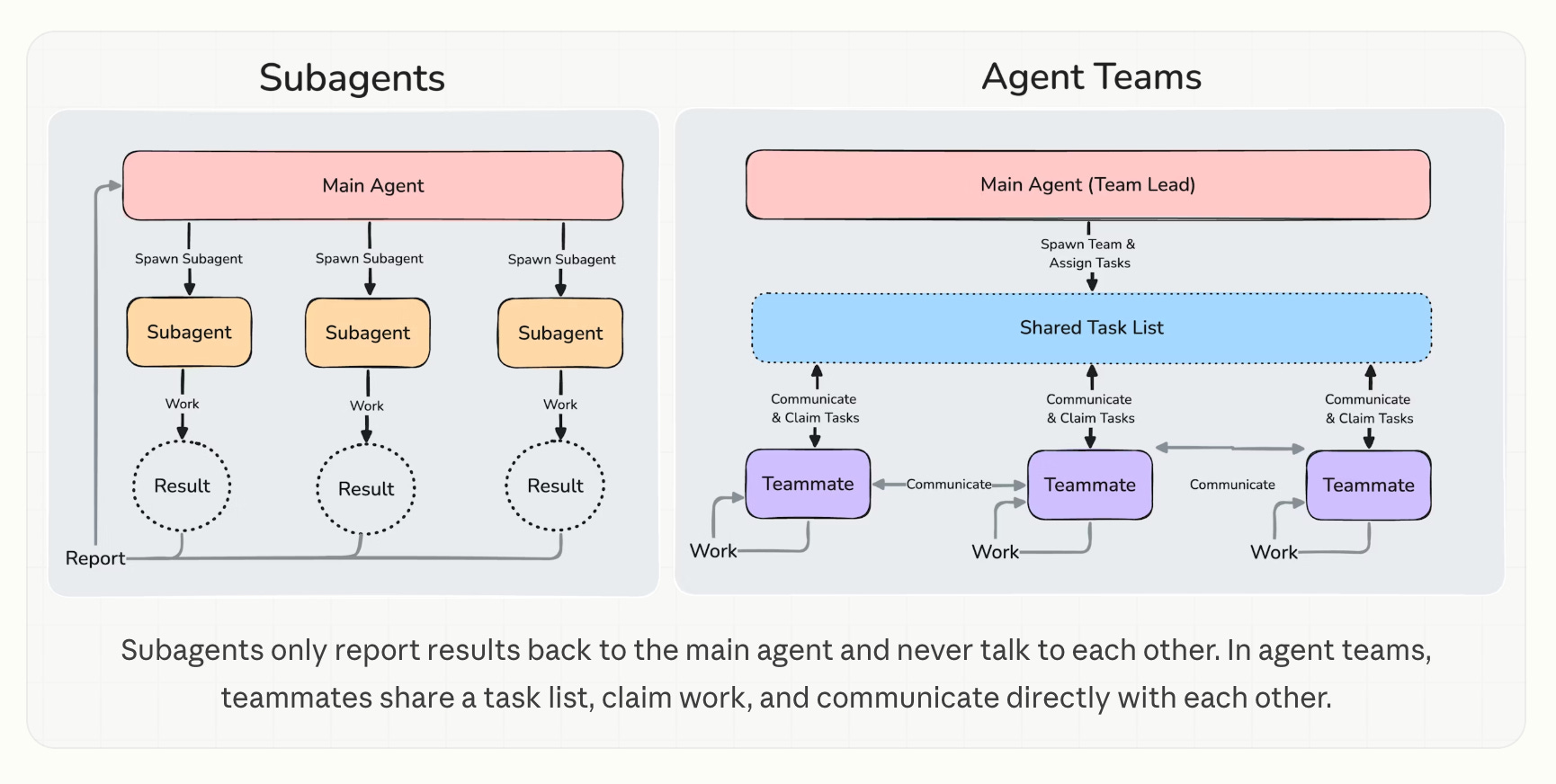
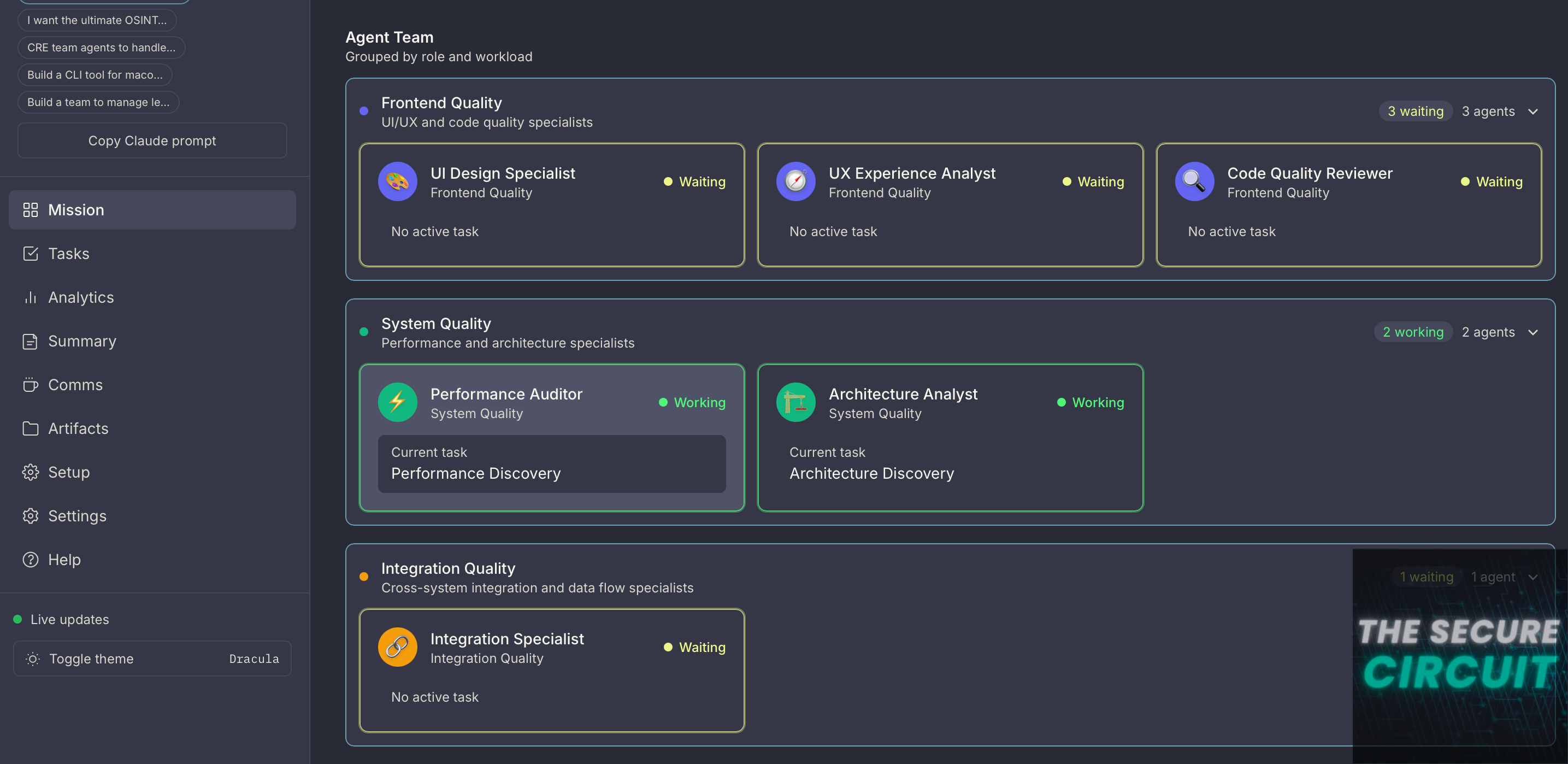
For security reviews, this parallel approach is genuinely transformative. You can spawn one agent to hunt for SQL injection vulnerabilities, another to scrutinize authentication flows, a third to examine your Supabase Row Level Security policies, and a fourth to review your API endpoints for improper authorization.
Each agent brings focused attention to a specific security domain, catching issues that a single general-purpose review might miss.
The lead agent then aggregates all findings into a comprehensive security report with prioritized remediation steps. It’s the kind of thoroughness that would take a human team days, accomplished in minutes!
The Built-in Security Command
Beyond Agent Teams, Claude Code also includes a dedicated /security-review command that performs automated security analysis on your codebase.
This command examines your code for common vulnerability patterns including injection attacks, authentication bypasses, insecure data handling, and exposure of sensitive credentials.
You can integrate this into your CI/CD pipeline via GitHub Actions, ensuring every pull request gets a security screening before merge. The combination of automated baseline scanning with deep-dive Agent Team reviews gives you both breadth and depth in your security posture.

Make Things Easier: Supabase MCP Server
To set up the Supabase MCP server specifically for Claude Code (the CLI) to connect to your Supabase project, follow these three steps
1. Get Your Access Token
Go to your Supabase Access Tokens page and generate a new token (e.g., “claude-code”). Copy it immediately, as you won’t be able to see it again.
2. Add the Server via CLI
Open your terminal and run the following command. This uses the claude mcp add command to configure the Supabase MCP server directly into your Claude Code profile:
claude mcp add supabase --command npx --args -y,@supabase/mcp-server-supabase@latest,--access-token,<YOUR_PERSONAL_ACCESS_TOKEN>
3. Verify the Setup
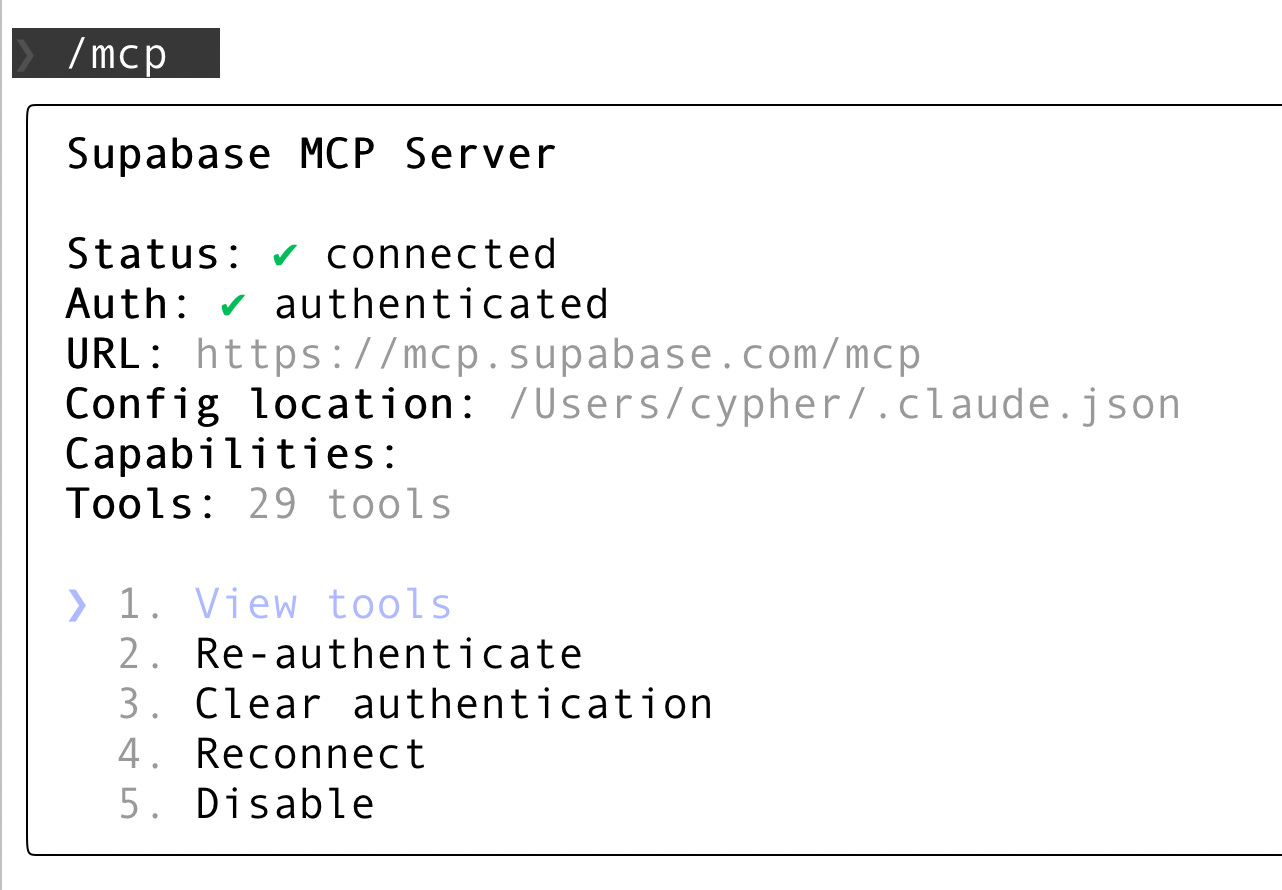
Inside a Claude Code session, use the internal slash command to confirm the server is active:
Start a session:
claudeRun the command:
/mcpYou should see “supabase” listed with a status of “Connected”.
10 Security Prompts to Lock Down Your Stack
Ready to put Agent Teams to work? Here are ten prompts you can copy directly into Claude Code. Each prompt is designed to be run as a specialized agent, so feel free to combine the prompts and tell claude to spawn multiple agents simultaneously to let them work in parallel.
These prompts specifically target Supabase and modern web application architectures, but the principles apply broadly.
1. Authentication & Session Management
Purpose: Find weaknesses in login/session handling (tokens, CSRF, OAuth, password flows) that could lead to account takeover.
Prompt:
Review my authentication implementation for vulnerabilities. Check for: session fixation risks, insecure token storage, missing CSRF protection, password handling issues, and OAuth flow security. Examine all auth-related code including Supabase Auth integration, JWT handling, and session management. Flag any hardcoded secrets or credentials.
2. Supabase Row Level Security Audit
Purpose: Validate every table is protected by strong RLS and spot policy gaps or bypass patterns before data leaks happen.
Prompt:
Audit all Supabase RLS policies for bypass vulnerabilities. For each table, verify that policies exist, check for overly permissive rules like “true” conditions, identify any service role key exposure in client code, and validate that user-scoped queries properly filter by auth.uid(). Generate a list of tables with missing or weak RLS policies.
3. SQL Injection & Query Security
Purpose: Detect injectable query patterns (raw SQL, string concatenation, unsafe dynamic clauses) and recommend safe parameterization.
Prompt:
Scan for SQL injection vulnerabilities across all database queries. Check raw SQL strings, dynamic query construction, any use of string concatenation in queries, and improper parameter binding in Supabase client calls. Also examine edge cases like ORDER BY injection and IN clause vulnerabilities.
4. API Authorization & Access Control
Purpose: Uncover broken access control (missing auth checks, IDOR, weak role checks) across all endpoints and handlers.
Prompt:
Review all API endpoints for broken access control. Identify endpoints lacking authentication checks, verify user ownership validation on resource access, check for IDOR (Insecure Direct Object Reference) vulnerabilities, and ensure admin-only routes have proper authorization middleware.
5. Input Validation & Sanitization
Purpose: Identify untrusted input paths that could enable XSS, command/path injection, or unsafe file operations.
Prompt:
Analyze input handling for XSS, command injection, and path traversal risks. Check all user inputs including form data, URL parameters, headers, and file uploads. Verify that outputs are properly encoded and that any file operations use sanitized paths. Flag any eval() or similar dangerous functions.
6. Secrets & Credentials Management
Purpose: Locate leaked keys/secrets and insecure config handling, and ensure sensitive values never ship in code or repos.
Prompt:
Search for leaked secrets and credentials in the codebase. Find hardcoded API keys, database URLs with embedded credentials, private keys, JWT secrets, and any sensitive configuration in version control. Check .env.example files don’t contain real values and verify proper use of environment variables.
7. Realtime & WebSocket Security
Purpose: Ensure realtime subscriptions/channels don’t expose data to the wrong users and that authorization holds under streaming.
Prompt:
Review Supabase Realtime subscriptions for data exposure risks. Check that channels don’t leak data to unauthorized users, verify RLS policies apply to realtime streams, ensure sensitive operations aren’t exposed via WebSocket, and validate that presence channels don’t reveal protected user data.
8. Storage & File Upload Security
Purpose: Verify bucket rules + upload handling prevent public data exposure, dangerous file uploads, and overwrite/collision risks.
Prompt:
Audit Supabase Storage bucket configurations and file handling. Verify bucket policies restrict access appropriately, check file type validation prevents executable uploads, ensure generated filenames don’t create collisions or overwrites, and validate file size limits are enforced.
9. Edge Function & Serverless Security
Purpose: Review serverless/edge code for auth gaps, CORS mistakes, secret exposure, and error leaks that aid attackers.
Prompt:
Review Supabase Edge Functions for security issues. Check for exposed environment variables, validate request authentication, ensure proper error handling doesn’t leak stack traces, verify CORS configurations, and check that service role keys are only used server-side.
10. Comprehensive Security Report
Purpose: Aggregate all findings into a prioritized, severity-rated report with locations, repro steps, and concrete fixes.
Prompt:
Act as a lead security reviewer. Create a team of agents and aggregate findings from all security agents and produce a prioritized report. Categorize issues as Critical, High, Medium, or Low severity. For each finding, provide the vulnerable code location, explanation of the risk, and specific remediation steps with code examples. Order by exploitability and impact.
Putting It All Together
Here’s how I recommend structuring your security review workflow with Claude Code. First, run the built-in /security-review command for baseline coverage.
Then, spawn an Agent Team with the first nine prompts as sub-agent specialized reviewers, and a tenth agent acting as the lead aggregator using prompt #10. This gives you both automated scanning and deep, domain-specific analysis.
Run this review before every major release, and definitely before any feature that touches authentication, payments, or user data.
The true beauty of this approach is that it scales with your codebase. As you add new features, your Agent Team expands its coverage.
The prompts above work for Supabase, but the same methodology applies whether you’re using PostgreSQL directly, MongoDB, or any other data layer. The key insight is that AI has democratized access to security expertise that was previously the exclusive domain of well-funded enterprises. Use it.
The Future of Security Reviews
Security isn’t a static destination; it’s an ongoing process. The attack surface of modern applications grows every day, and the sophistication of attackers grows with it. Traditional security review approaches cannot keep pace with modern development velocity.
But with Claude Code’s Agent Teams, you have a security team that scales infinitely, works tirelessly, and improves constantly. The question isn’t whether you can afford to implement AI-powered security reviews.
The question is whether you can afford not to. Your users trust you with their data. Honor that trust by giving security the attention it deserves, powered by the best tools available.
References
[1] Claude Code Agent Teams Documentation
[2] Automated Security Reviews in Claude Code
The parallel security squad approach solves something real - sequential reviews miss the cross-domain issues (auth bypass that's only visible when you look at both the database policy and the API layer simultaneously).
What I'd add: the agent orchestration pattern here works because the sub-tasks are largely independent. When they're not - when agent A's output changes agent B's scope - you need explicit handoff logic. That's where agent teams get complicated fast.
Been running multi-agent setups for other tasks: https://thoughts.jock.pl/p/building-ai-agent-night-shifts-ep1
How do you handle mid-review scope changes? Does the security reviewer re-run, or do you flag for manual followup?
‘The true beauty of this approach is that it scales with your codebase. As you add new features, your Agent Team expands its coverage.’
this is definitely a huge selling point imo. great read :)